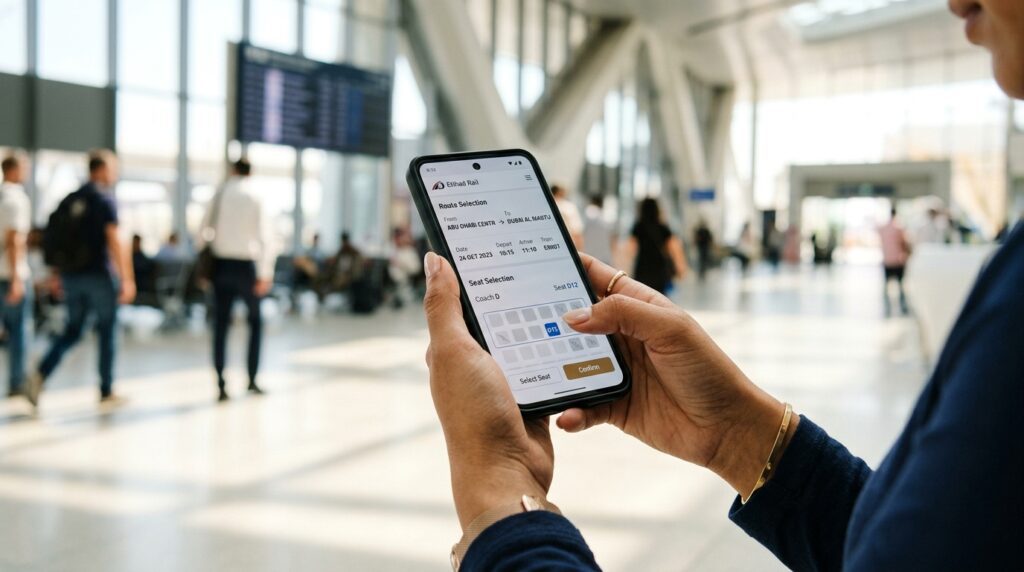
Etihad Rail ticket booking works through four channels: the Etihad Rail app, the website, ticket machines at stations and the Contact Centre. You can book as a guest, choose Comfort or Premium, pick a fare type and pay by card, Apple Pay or Google Pay. Seats sell up to five minutes before departure.
Etihad Rail recommends the app or website for the widest choice of fares, and we agree. The walkthrough below follows the app, which works the same way as the site. Before you book, check departures and fares on our Etihad Rail routes from Dubai page.
Where can you book Etihad Rail tickets?
Etihad Rail’s official FAQ lists four ways to buy.
| Channel | Best for | Watch out for |
| Etihad Rail app | Everyday trips, seat choice, live updates | Needs a data connection at the station |
| Website (etihadrail.ae) | Planning at a desk, booking for others | Same fares as the app |
| Ticket vending machine | Last-minute trips, paying cash | Some fare types are not sold here |
| Contact Centre | Groups, special help, problems | Slower than doing it yourself |
You do not need an account to book Etihad Rail tickets. An account keeps your bookings in one place and saves your details, which helps if you travel often.
Etihad Rail booking step by step
This is the order the screens follow when you book a train ticket in the app. The steps are the same whether you book an Abu Dhabi, Fujairah or Sharjah trip.
- Open the app or website. Download “Etihad Rail: Buy Train Tickets” from the App Store or Google Play, or go to etihadrail.ae. Sign in, or carry on as a guest.
- Choose your stations. Pick the departure and arrival stations. Dubai’s station appears as Dubai Station, and Abu Dhabi’s as Abu Dhabi Station, which is in Mohamed Bin Zayed City.
- Set the date and passengers. Add a return date if you want both legs on one booking.
- Pick a departure. The list shows each train with its price. On the Dubai to Abu Dhabi route there are five trains a day at launch.
- Choose a class. Comfort or Premium. Premium costs more for wider, reclining seats.
- Choose a fare type. Saver, Value or Flex, which decides whether you can change or cancel later.
- Pick your seat. Seat choice is free on some fare types and paid on others.
- Enter passenger details. Type each name exactly as it appears on the traveller’s ID, then add an email and mobile number.
- Add extras. In Abu Dhabi you can add the Dh10 shuttle bus to the city stops. Extra bags must also be arranged in advance.
- Pay and save your ticket. The e-ticket arrives in the app and by email. You do not need to print it.
That is the whole process. Most people finish it in a few minutes once they have decided on the train.
Booking on the app or the website: which is better?
Both sell the same trains, and Etihad Rail says both give the widest choice of fares. The difference is what happens after you pay.
The app keeps your e-ticket on your phone, sends real-time journey updates and lets you change or cancel under My Bookings. It also shows station information and connection options. For regular trips, that makes the app the better choice.
The website is easier when you are booking your train ticket for a parent or a colleague, or comparing several dates on a bigger screen. You can forward the e-ticket to the traveller by email. Etihad Rail booking on the site is also useful if your phone is short on storage.
When should you book?
Earlier than you think for Fridays and holidays. Fares are set by demand, so the lowest prices on popular departures tend to go first, and the Dh39 Comfort seat you saw on Monday may not be there on Friday morning when everyone else is heading to Abu Dhabi. Etihad Rail’s FAQ asks passengers to book in advance during busy periods to secure their preferred journey and seat.
Fares are dynamic. On the Dubai to Fujairah route, Khaleej Times saw Comfort fares move between Dh29 and Dh49 across launch week, depending on the date. The same pattern applies to the Abu Dhabi route, where Premium rose from Dh109 to Dh129 on one departure.
For a weekday commute, booking the day before is usually enough. For a weekend or a public holiday, buy Etihad Rail tickets as soon as your plans are settled.
Which fare type should you choose?
Etihad Rail’s FAQ confirms that each fare type has its own rules for changes, refunds and seat selection. The details below come from Gulf News reporting in June 2026, when the three types launched. Check them on the booking screen, because conditions can change.
| Fare type | Changes | Refunds | Seat selection |
| Saver | Not allowed | Not refundable | Paid |
| Value | Free until 72 hours before departure, then Dh20 plus any fare difference | Not refundable | Free |
| Flex | Free until 30 minutes after departure | Full refund 24 hours or more before; 30% fee on the day | Free |
Our advice: book Saver only when your plans are fixed. For work trips, or anything involving children, pay for Value or Flex. Car-sales site Dubicars reported the step-ups at about Dh10 for Value and Dh20 for Flex at launch, which is cheap insurance against a lost ticket.
Paying for your ticket
Payment is the last screen when you buy Etihad Rail tickets online.
You can pay with a credit or debit card, Apple Pay, Google Pay and other compatible digital wallets, according to Etihad Rail. The price shown at checkout includes all taxes and fees.
Your nol card and TAMM cannot be used for Etihad Rail tickets. The FAQ says tickets are sold only through Etihad Rail’s own channels. If a card payment fails, check with your bank, then try again with the same card or another option.
Buying a ticket at the station machine
If you would rather book a train ticket in person, the ticket vending machines at the stations take contactless cards, digital wallets and cash in AED banknotes. They are handy if your phone battery is low or you want to pay cash.
There are two catches. Some fare types are not sold at the machines, and sales close shortly before departure. If the train is busy, the cheapest seats may already be gone by the time you reach the machine.
Changing, cancelling or missing a train
Changes depend on the fare type you chose when booking your train ticket. Eligible bookings can be changed or cancelled in the app or on the website under My Bookings, at a ticket machine, or through the Contact Centre. Any change is subject to availability and the fare difference.
Missing a train is costly. Etihad Rail says a ticket is valid only for the service booked, so a missed train means buying a new ticket. If Etihad Rail cancels your train, it offers rebooking, alternative transport or a refund.
Booking for someone else, groups and discounts
You can book a train ticket for a friend or relative by entering their details and forwarding them the e-ticket. The traveller must carry ID that matches the name on the ticket.
Groups are welcome, subject to seat availability. For larger groups, Etihad Rail asks you to contact its Customer Service Team.
Discounted fares may be available for eligible passenger categories, and you must carry proof of eligibility. Etihad Rail does not yet offer loyalty schemes, family tickets or season tickets. It says any such products will be announced on its official channels.
Luggage to plan for when you book
Each passenger aged three and over can bring two items free of charge, whatever the ticket type, as reported by Gulf News. One is a personal item that fits under the seat. The other is a cabin bag no larger than 55 x 40 x 23 cm, which goes in the overhead rack.
Anything beyond that has to be arranged before you travel, ideally at the same time as your Etihad Rail booking, through the app, website, Contact Centre or at the station. Bicycles, e-bikes and electric scooters are not allowed. A pet carrier of the same maximum size replaces your cabin bag, and certified assistance dogs need advance booking.
Using your ticket at the station
Dubai’s and Abu Dhabi’s stations open from 05:00 to 23:00 every day, according to Etihad Rail’s station pages. Khaleej Times reported automated ticket barriers at the Abu Dhabi station when it opened.
Have the e-ticket open before you reach the gate, with the screen brightness up. Keep your ID in the same pocket. We would allow at least 20 minutes if you are arriving by Metro in Dubai, because of the walk across the transfer bridge.
Common booking mistakes
The name does not match the ID. This is the mistake we would worry about most, because staff may check ID against the ticket. Use the name on the traveller’s Emirates ID or passport, not a nickname.
The wrong Abu Dhabi stop gets chosen. Trains arrive at Mohamed Bin Zayed City. ADNEC Centre, the Corniche and Reem Mall are shuttle stops, not rail stations.
The shuttle gets forgotten. It happens a lot. The Dh10 shuttle bus has to be booked in advance, and adding it at the same time as the train is easiest.
The cheapest fare gets picked for an uncertain trip. A Saver fare cannot be changed, so a small change of plan means paying twice.
Frequently asked questions
Can I book Etihad Rail tickets without an account?
Yes. Etihad Rail lets you book as a guest on the app or website. An account is optional, but it keeps your bookings, journey history and saved passenger details in one place. That makes changes easier later, and it speeds up future bookings if you plan to use the train regularly.
How late can I buy an Etihad Rail ticket?
Tickets can be bought up to five minutes before departure, subject to availability, according to Etihad Rail’s FAQ. You cannot board without a valid reservation. Ticket machine sales close shortly before the train leaves, so buying in the app is the safer choice when you are running late.
Can I use my nol card for Etihad Rail?
No. Etihad Rail sells tickets only through its app, website, station ticket machines and Contact Centre. The nol card and TAMM are not accepted for train tickets. You can still use your nol card for the Dubai Metro ride to the Jumeirah Golf Estates station, which is next to the rail terminal.
What happens if I miss my Etihad Rail train?
Your ticket is valid only for the train you booked, so a missed train means buying a new ticket. Flex fares allow free changes until 30 minutes after departure, based on Gulf News reporting of the fare rules. That is the main reason to choose Flex when your timing is uncertain.
Do I need to print my Etihad Rail ticket?
No. You can show the e-ticket on your phone, and a printed copy is also accepted if you prefer paper. Keep your ID with you, because staff may ask to see it alongside the ticket. Download the ticket before you set out, in case mobile data is weak at the station.
Your Etihad Rail ticket booking checklist
Before you pay, check four things: the station names, the departure time, the fare type and the passenger names. Those four checks prevent the most common problems with Etihad Rail ticket booking.
Then plan the trip itself. Our Dubai to Abu Dhabi timetable lists every departure, the Comfort vs Premium guide helps you pick a class, and the Abu Dhabi station guide explains the shuttle stops. For more, see the Dubai station guide, our UAE travel section or the Live In Gulf homepage. Etihad Rail’s Abu Dhabi station page shows live departures.